 How-to
How to Create Professional Business Videos Without a Film Crew
Last Updated: November 12, 2026
Quick Summary
You can create professional business videos without a film crew by writing a one page brief, planning the story with a script template and choosing a production route such as AI video production. AI production turns your existing website and marketing material into a polished video with human creative direction, no filming day and no cost until you approve the concept.
- Write a one page brief covering audience, message, call to action, platform and success measure before filming.
- Use a five beat script template: hook, context, proof, offer and call to action.
- Keep social feed videos to 15 to 30 seconds and website homepage videos to 60 to 90 seconds.
- If filming yourself, use the rear camera, front lighting and a clip on microphone.
- Set up tracking before you publish so you can measure watch time, click through rate and conversion rate.
Table of Contents
- Start With a Brief That Defines Purpose and Audience
- Use a Business Video Script Template to Plan the Story
- How Long Should a Business Video Be for Each Platform
- Choose Your Production Route: Filming, Templates or AI Video Production for Businesses
- Record and Edit to a Professional Standard
- Study Business Video Examples That Get Results
- Publish, Measure and Improve Performance
- Book a Consultation and Get Your First Concept
- Frequently Asked Questions
Start With a Brief That Defines Purpose and Audience
Every strong piece of business video content starts with a one page brief, not a camera. The brief states who the video is for, what single action you want viewers to take, and where the video will run. Get those three answers down and the rest of the process gets easier.
At Apex Video Promotions, we ask clients for exactly this before anything else. Without it, even a polished video drifts.
A useful brief answers five questions:
- Who is watching? Be specific: a first time buyer, a returning customer, a trade partner.
- What is the one message? If you cannot say it in a sentence, cut it.
- What should they do next? Call, book, buy, enquire.
- Where will it appear? Website, social feed, paid ad, email.
- How will you judge success? Views, clicks, enquiries, sales.
A business video brief is a short written plan that defines the audience, the core message, the call to action, the platform and the success measure before any production begins. Writing it takes about twenty minutes and saves hours of rework later.
Watch out: the most common mistake is skipping the brief and jumping straight to filming. You end up with footage that looks fine but sells nothing.
Use a Business Video Script Template to Plan the Story
A reusable business video script template keeps every video consistent and cuts planning time to minutes. Ours follows a simple structure you can copy today.
Business video script template
- Hook (0-5 seconds): State the problem or the outcome. "Tired of chasing late paying clients?"
- Context (5-15 seconds): Who you help and how. "We handle credit control for small firms."
- Proof (15-35 seconds): One specific result, testimonial or demonstration.
- Offer (35-50 seconds): What you do, plainly.
- Call to action (50-60 seconds): One instruction. "Book a free review at [your site]."
Read the script out loud. If a sentence trips you up, it will trip up your viewer too. Cut it.
The Five Beats Every Script Needs
Those five beats, hook, context, proof, offer and call to action, are the backbone of persuasive content. You can stretch or shrink each one, but never drop one.
- Hook: earns the next five seconds
- Context: tells the viewer this is for them
- Proof: earns belief
- Offer: makes the value clear
- Call to action: tells them exactly what to do
Most weak business videos fail at proof and call to action. They describe the company and then stop. A viewer needs a reason to believe you and a clear next step.
How Long Should a Business Video Be for Each Platform
How long a business video should be depends on where it runs, not on how much you want to say. Short wins on social. Website videos can run longer because the viewer already chose to be there.
| Platform | Sweet spot | Why it works |
|---|---|---|
| Social feed | 15-30 seconds | Stops the scroll, easy to finish |
| Website homepage | 60-90 seconds | Explains the offer to a warm visitor |
| Product demo | 60-120 seconds | Shows enough to build trust |
| Paid ad | 15-20 seconds | Keeps cost per view down |
Sweet spot
For detailed size and aspect ratio guidance, see our best video formats for social media guide.
Keep every video as short as it can be while still making the point. If you can cut a line without losing meaning, cut it.
Choose Your Production Route: Filming, Templates or AI Video Production for Businesses
There are three realistic routes: film it yourself, use a template tool, or use AI video production for businesses. Each suits a different budget, skill level and deadline.
Filming yourself gives you full control and authentic faces. It needs a camera, lighting, decent audio and time to edit. A common mistake is underestimating audio: poor sound ruins an otherwise good video.
Template tools are quick and cheap, but your video can look like everyone else's. Fine for a quick social clip, weak for a website hero video.
AI video production turns your existing website, product info or marketing material into a polished video, with human creative direction and editing behind it. No crew, no filming day, no disruption to your business. Our AI promotional video production service is built around exactly this approach.
You can see how our four step process works if you are weighing up the no filming route.
What Each Route Actually Costs You
Cost is where the routes really separate. Filming yourself looks cheap until you count the hours, the kit and the reshoots. Traditional agencies bring a crew, a schedule and a large upfront bill.
AI production removes most of that overhead. You provide a brief and your existing material; the concept comes back fast, often within 24 hours with us, and you pay nothing until you approve it.
Pricing depends on scope, video length and turnaround, so we quote per project rather than publish a fixed rate. For a direct comparison against traditional filming, see our affordable promotional video production page.
Record and Edit to a Professional Standard
If you are filming yourself, the difference between amateur and professional comes down to a handful of settings and habits.
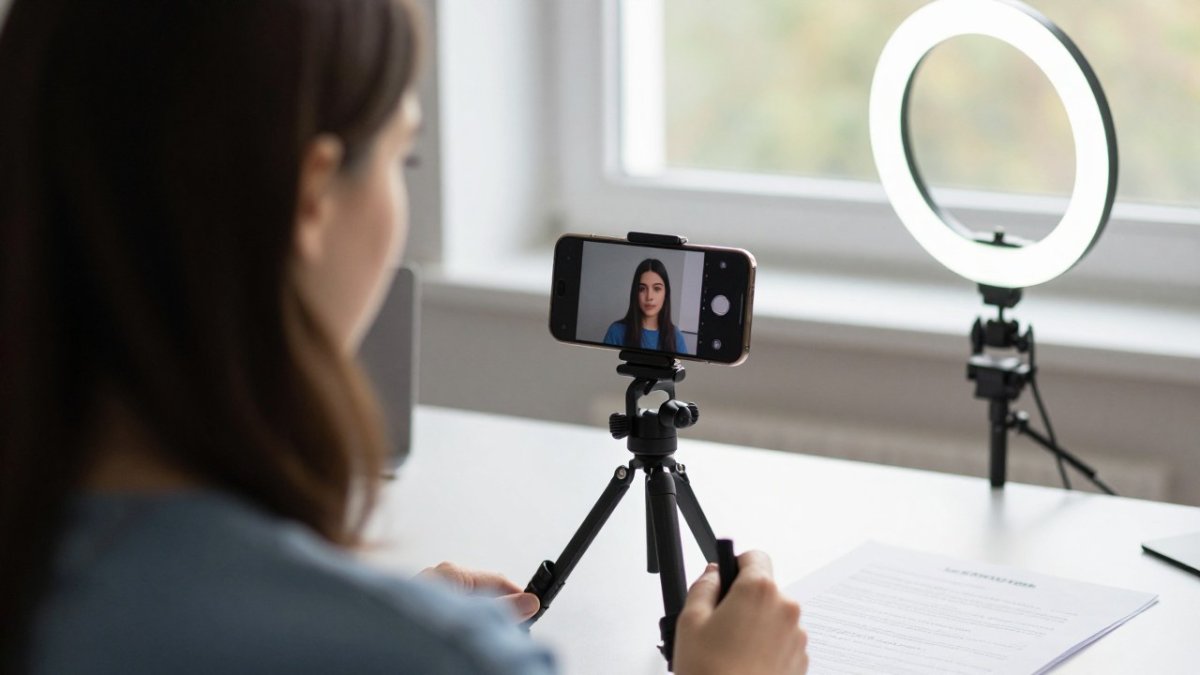
Camera and framing. Use your phone's rear camera, not the front one, because the rear sensor is better in low light.
Lighting. Light your subject from the front, ideally with a window or a ring light.
Sound. Use a clip on microphone or a lavalier; phone audio in a quiet room is a last resort. Record a few seconds of room tone so you can smooth edits later.
Editing. Cut every pause and every filler word. Keep cuts tight and remove anything that does not move the viewer toward the call to action.
Export settings and accessibility. Export at 1080p as a minimum, using H.264 in an MP4 container for broad compatibility.
Watch out: exporting at the wrong aspect ratio or forgetting safe areas is the most common reason a video looks fine on a desktop but is cropped or covered on a phone.
If editing feels like a time sink, AI production skips this step entirely. We handle the edit and the polish, and you review the finished concept.
Study Business Video Examples That Get Results
The fastest way to improve is to study business video examples that actually convert. Watch the top videos in your sector and note three things: the hook, the proof and the call to action.
You will notice a pattern. The best ones show a real outcome quickly, use plain language and ask for one clear action. They rarely open with a logo animation or a list of services.
Our own real promotional video examples show how limited input becomes high converting content. Look at how each one opens and closes, then copy that discipline into your own script.
Publish, Measure and Improve Performance
A video is not finished when it is exported. Set your success measures in the brief, then track them consistently.
Set up tracking before you publish. Use your analytics platform to track video plays, watch time, click through rate and conversion rate. The Google Analytics help centre shows how to set up event tracking for video plays and clicks.
Know what good looks like. Watch time tells you whether the hook and pacing hold attention; if viewers drop off in the first five seconds, the hook is weak. Click through rate tells you whether the call to action is clear; if people watch to the end but do not click, the offer or the instruction is unclear. Conversion rate tells you whether the landing page delivers on the video's promise; if clicks are high but enquiries are low, check the page rather than the video. Return on investment compares enquiries or sales to what the video cost, including your time.
Run one change at a time. Test a new hook, keep everything else the same, and compare results over a few weeks. Changing several things at once makes it impossible to know what worked. Keep a simple log of what you changed and what happened.
Use the numbers to decide what to make next. If a customer story video outperforms a product demo, make more customer stories. If a short social clip drives more enquiries than a longer website video, shift your effort. The measurement loop is what turns a one off video into a repeatable marketing asset.
Watch out: the most common mistake is publishing without tracking, then guessing whether the video worked. Set the measures in the brief and check them before you publish.
Book a Consultation and Get Your First Concept
The gap between a good idea and a finished video is usually time, cost and hassle. That is the gap we close. Apex Video Promotions turns your website and brand into a professional promotional video in four simple steps, with no filming and no cost until you approve your concept.
We combine AI generated visuals and voice with human scriptwriting, editing and marketing direction, so your video does not look like a template. Concepts are delivered within 24 hours, and full turnaround is approximately 2 weeks.
If you want to see what that looks like for a business like yours, book a free 30 minute discovery call and we will talk through your goals and the right video for your website.
Your next video does not need a crew, a studio or a three week wait. It needs a clear brief, a tight script and the right production route. Get those right and you will have content that earns attention and turns visitors into customers.
Get started with Apex Video Promotions and turn your website into a video that converts.
Frequently Asked Questions
What equipment do you need to make business videos?
A modern smartphone covers most needs: shoot in landscape for website and YouTube, portrait for social stories, and use the rear camera rather than the front one for better quality. Add a tripod or phone clamp, a clip-on microphone within about 30cm of the speaker, and a window or soft lamp for lighting. For screen-led content, a screen recorder and a basic editing app are enough. If you would rather skip equipment entirely, AI video production for businesses removes the shoot altogether.
Can AI create professional business videos?
Yes, when AI generation is paired with human creative direction. AI handles visuals, voice and assembly quickly, while a scriptwriter and editor shape the message, pacing and brand consistency. The result is a polished promotional video without filming days or camera crews. The key difference from template-only tools is the human input: a brief-led concept, a proper script and an edit that matches your brand identity, rather than a generic clip anyone could have made.
How long should a business video be?
Match length to purpose and platform. Website hero and social feed videos work best between 15 and 60 seconds, product demonstrations between 60 and 120 seconds, and explainer or customer story videos between 90 seconds and three minutes. Anything longer needs a clear reason, such as a detailed training walkthrough. Check the current maximum length on each platform before you publish, and cut the first draft by around a fifth, since most viewers drop off early.
How do you write a script for a business video?
Open with the problem your viewer recognises, state your key message in one sentence, then show proof through a product demonstration or customer story. Close with a single call to action. A business video script template with columns for visuals, voiceover and on-screen text keeps the shoot or edit on track. Read the script aloud and time it: at a natural pace you cover roughly 130 to 150 words per minute, so a 60 second video needs about 140 words.